
How to write ai image prompts: Beginner Formula & Examples
One of the most common problems users face when using AI image generators is that their results often do not match what they imagined. The image may look incomplete, too random, or missing important details, especially when the prompt is not clearly structured.
This is why learning how to write ai image prompts is very important.
A good prompt gives the AI clear instructions about what to create, including subject, style, lighting, and composition. When you understand this skill, you can control the final image instead of guessing and hoping for good results. In this guide, you will learn a simple method to build strong AI prompts step by step. You will also see real examples, a clear formula, and common mistakes to avoid.
What Is This AI Image Prompt? (Simple Explanation)
An AI image prompt is a written instruction that tells an AI tool what image to generate. It is like giving directions to an artist. The clearer your instructions, the better the final image.
A good prompt usually includes several key parts:
- Subject (main focus of the image)
- Style (type of art or visual look)
- Environment (background or location)
- Lighting (how light appears in the scene)
- Composition (camera angle or framing)
- Details (mood, quality, emotions, textures)
For example:
Weak prompt:
“a dog in a park”
Stronger prompt:
“a golden retriever sitting in a sunny park, cinematic style, soft natural lighting, shallow depth of field, highly detailed fur, peaceful mood”
The difference is clarity. This is the foundation of how to write ai image prompts effectively.
How to write ai image prompts: AI Image Prompt Formula (CORE SECTION)
The best way to create strong prompts is by using a simple structure. This helps you avoid confusion and improves consistency.
AI Image Prompt Formula:
Subject + Style + Environment + Lighting + Camera + Details
Each part plays an important role:
Subject: What the image is about
Style: Visual style (realistic, anime, 3D, painting)
Environment: Where the scene happens
Lighting: Type of lighting used
Camera: Angle, lens, or framing style
Details: Mood, textures, and finishing quality
Example:
“A young astronaut (subject), cinematic 3D render (style), floating in space near a glowing planet (environment), dramatic blue lighting (lighting), wide-angle shot (camera), ultra-detailed suit, emotional atmosphere (details)”
This formula is the core of how to write ai image prompts in a structured way.
Step-by-Step Guide: How to Create the Perfect AI Image Prompt
Step 1: Choose Your Subject
Start by clearly defining what you want the AI to create. This is the most important part.
Example:
“A medieval knight”
A clear subject prevents confusion in the final image.
Step 2: Add Visual Style
Next, choose how the image should look.
Example:
“A medieval knight in cinematic style”
You can use styles like:
- Photorealistic
- Anime
- Digital painting
- 3D render
- Watercolor
Step 3: Define the Environment
Now decide where the subject is placed.
Example:
“A medieval knight standing in a burning battlefield”
The environment adds context and storytelling.
Step 4: Add Lighting
Lighting affects mood and realism.
Example:
“…with dramatic sunset lighting and smoke in the air”
Common lighting types:
- Golden hour
- Neon glow
- Soft studio light
- Moonlight
- Volumetric lighting
Step 5: Add Camera & Composition
This controls how the image is viewed.
Example:
“wide-angle shot, low camera angle, cinematic framing”
This step makes images feel professional and realistic.
Step 6: Add Details & Mood
This is where you improve quality and emotion.
Example:
“highly detailed armor, intense emotional expression, realistic textures, dramatic atmosphere”
Details help the AI refine output quality.
Step 7: Combine Into One Full Prompt
Final Example:
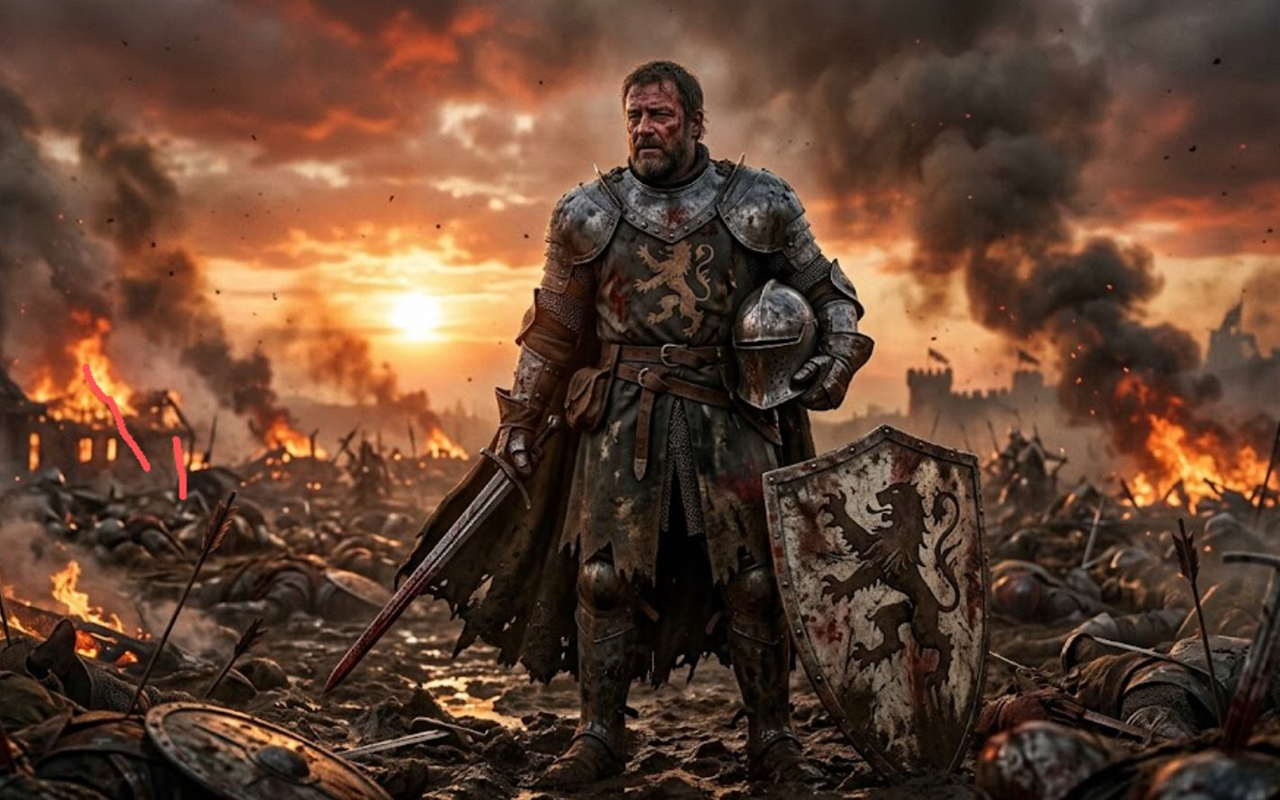
“A medieval knight standing in a burning battlefield, cinematic style, dramatic sunset lighting with smoke in the air, wide-angle low camera angle, highly detailed armor, intense emotional expression, ultra-realistic textures, epic atmosphere”
This is a complete structured prompt using the full method of how to write ai image prompts.
Here is Generated image
High-Quality AI Prompt Examples
Example 1: Realistic Portrait
Prompt:
“A realistic portrait of an elderly woman with wrinkles and soft smile, sitting near a window, natural sunlight coming through curtains, 85mm lens, shallow depth of field, ultra-detailed skin texture, emotional and warm atmosphere”
Example 2: Cyberpunk Scene
Prompt:
“A futuristic cyberpunk city at night, glowing neon signs, flying cars in the sky, rain reflecting lights on the ground, cinematic 3D render, wide-angle shot, ultra-detailed, blue and purple lighting”
Example 3: Fantasy World
Prompt:
“A magical floating island with waterfalls falling into the clouds, ancient temples covered in vines, fantasy digital painting style, soft glowing light, highly detailed, dreamy atmosphere”
Example 4: Anime Character
Prompt:
“Anime-style boy standing under cherry blossom trees, gentle wind blowing petals, soft pastel colors, emotional expression, studio lighting, detailed background, cinematic composition”
Advanced Prompt Engineering Tips
- Use specific words instead of general terms
- Add camera terms like “macro shot” or “close-up”
- Control style using clear labels like “photorealistic” or “anime”
- Add negative prompts to remove unwanted results (blurry, low quality, extra limbs)
- Focus on one subject per prompt for better accuracy
These techniques improve control and help refine how to write ai image prompts at a higher level.
Common Mistakes in AI Image Prompt Writing
1. Vague Descriptions
Problem: “a car”
Fix: Add style, lighting, and environment
2. Too Many Unrelated Details
Problem: Confusing or messy prompts
Fix: Keep structure clear and focused
3. Missing Lighting or Style
Problem: Flat or low-quality images
Fix: Always include lighting and style direction
4. No Clear Subject
Problem: AI does not know what to focus on
Fix: Start every prompt with a strong subject
FAQ: how to write ai image prompts
What is the easiest way to write AI image prompts?
Use a simple structure: subject, style, environment, lighting, camera, and details.
How to write ai image prompts for better results?
Be specific and include visual details like lighting, style, and composition.
Why do my AI prompts fail?
Most failures happen due to vague wording or missing key elements like lighting and style.
Can beginners learn how to write ai image prompts easily?
Yes, with a simple formula and practice, beginners can quickly improve results.
How long should an AI image prompt be?
Usually 1-3 clear sentences with structured details work best.
Final Word
Learning how to write ai image prompts is one of the most important skills for getting better results from AI image generators. A structured approach helps you control style, lighting, and composition instead of relying on random outcomes.
By using the formula, following step-by-step methods, and avoiding common mistakes, you can create clear, detailed, and high-quality prompts. With practice, your AI-generated images will become more consistent, realistic, and visually powerful.